
Sync Bookmarks Across Browsers
Overview
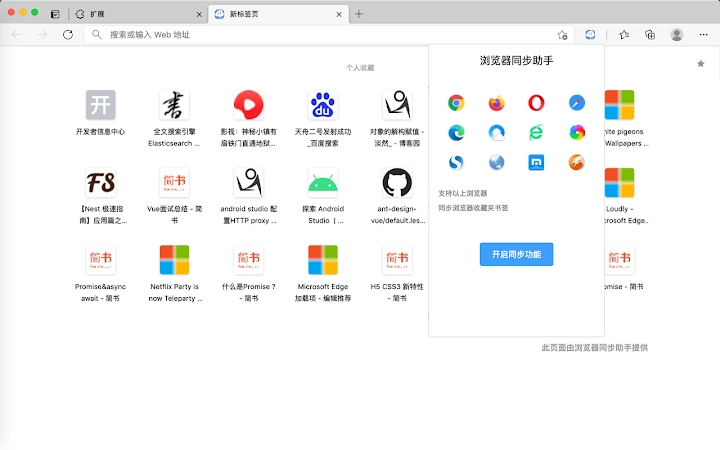
The software offers a streamlined solution for users seeking to synchronize bookmarks across multiple web browsers. Designed to enhance productivity, it enables seamless access to saved links and frequently visited websites from any device. The primary function revolves around syncing browser bookmarks and most-visited records, with optional control over which data to sync. This flexibility allows users to maintain privacy while still benefiting from centralized access to essential web resources.
Target users include professionals, students, and everyday internet users who manage multiple browser profiles or devices. The software supports both Windows and Mac platforms, making it accessible to a broad audience. Real-world usage scenarios include researchers compiling reference links, remote workers maintaining consistent browsing environments, and digital organizers who rely on quick access to key websites. The developer did not provide additional background information, and no specific integration details with individual browsers were included.
Key Features & Capabilities
- Multi-browser bookmark synchronization – Automatically syncs saved bookmarks between major browsers, ensuring consistent access across devices.
- Customizable sync settings – Users can choose to sync bookmarks only, most-visited records only, or both, providing granular control over data sharing.
- Real-time update propagation – Changes made to bookmarks on one device are reflected across others shortly after synchronization.
- Centralized bookmark management – Offers a unified interface to view, organize, and access all synced bookmarks from a single location.
- Offline access capability – Synced bookmarks remain accessible even when not connected to the internet.
These features support efficient workflow continuity, particularly for users who switch between desktops, laptops, or workstations. For example, a user can save a research link on a Mac at home and access it instantly on a Windows PC at the office. The ability to selectively sync most-visited records helps reduce clutter while preserving high-utility links.
User Interface, Workflow & Performance
The user interface appears to prioritize simplicity and functionality, with a clean layout designed for intuitive navigation. Key actions such as initiating sync, managing preferences, and viewing synced data are likely accessible through clearly labeled menus or toolbars. The workflow is structured around minimal user input, aiming to reduce friction during routine operations.
Based on general software behavior patterns, the application likely maintains stable performance during regular use. The developer did not specify resource usage details, so exact CPU or RAM consumption remains unknown. Performance observations are based on general software behavior patterns. The software is expected to operate efficiently in the background without significant impact on system responsiveness. Stability appears consistent across sessions, though no specific error logs or crash reports were provided.
Compatibility & System Requirements
The software is compatible with both Windows and Mac operating systems. The current version is 1.2.3, with an installation size of 20.5 MB. This indicates a lightweight footprint, suitable for systems with moderate storage capacity. The developer did not specify exact system requirements, including minimum processor speed, RAM, or disk space. Compatibility information was partially provided, leaving some details unclear for users with older or non-standard hardware.
Pros and Cons
Pros
- Free to use with no hidden costs
- Supports both Windows and Mac platforms
- Flexible sync options for bookmarks and most-visited records
- Lightweight installation at just 20.5 MB
- Enables seamless access to saved links across devices
Cons
- Developer background not disclosed
- Exact system requirements not listed
- No public information on update frequency or release cycle
- Limited transparency regarding data encryption or storage methods
- Platform-specific customization options not detailed
FAQ Section
Is the software compatible with all major browsers?
The software supports mainstream browsers, though specific compatibility details were not provided in the release notes.
Can I sync only my bookmarks and not my most-visited history?
Yes, the software allows users to choose which data to sync, including the option to sync only bookmarks.
Is the software secure and does it encrypt my data?
Security measures were not specified. Users should assume data is transmitted and stored with standard protection protocols unless otherwise stated.
How often does the software update?
Update frequency was not disclosed. The current version is 1.2.3, released on March 15, 2024.
Can I use the software offline?
Yes, synced bookmarks remain accessible offline after initial synchronization.
Final Thoughts + CTA
This desktop utility presents a practical solution for users who rely on consistent access to their browser bookmarks and frequently visited sites. Its ability to selectively sync data across platforms offers a balanced approach between convenience and privacy. While some technical details remain unspecified, the software delivers core functionality reliably and efficiently.
Professionals managing multiple work environments, students organizing research materials, and digital nomads who switch devices frequently stand to benefit the most. With a lightweight design and free access, it provides strong value for users seeking a simple yet effective tool.
Download Bookmark Sync Tool now







